
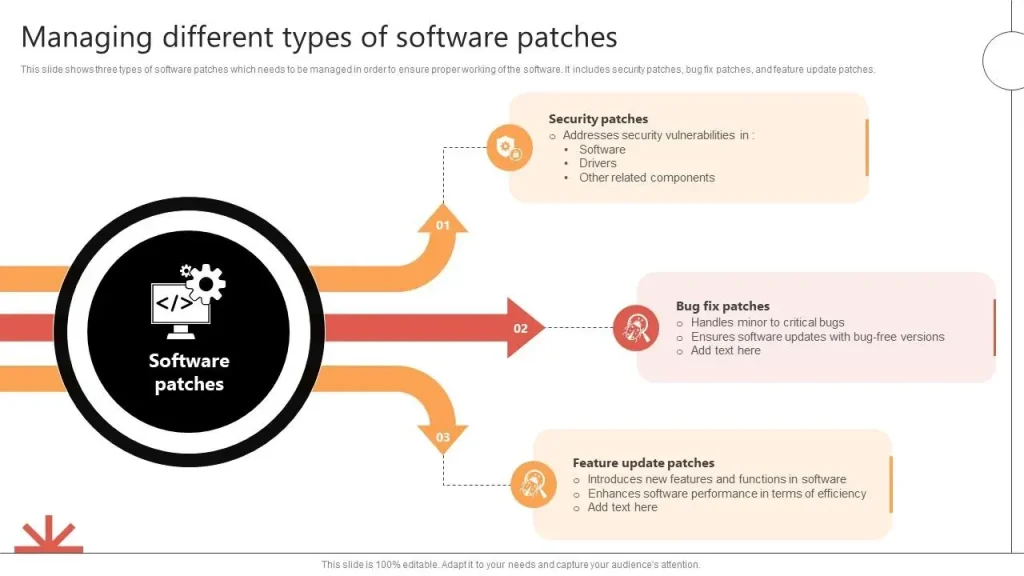
Software patches are small, targeted updates that fix vulnerabilities, repair bugs, and sometimes enhance performance. In today’s security landscape, effective patch management hinges on timely software patching and clear governance. By prioritizing security patches and system updates, organizations reduce exposure and strengthen resilience. A well-designed program also covers vulnerability remediation, testing, and phased deployment to minimize disruption. This article explains why regular updates matter and how to build a practical patching strategy that protects your organization.
Viewed through an alternative lens, the same practice is software maintenance and security updates that close gaps before attackers act. Organizations implement a structured patching cycle, often called update management, to keep assets current and reduce risk. This approach emphasizes vulnerability remediation, risk-based prioritization, testing, and gradual deployment to minimize disruption. A mature program combines asset discovery, governance, and automation to deliver reliable protection across endpoints and servers.
1) Understanding Software Patches and Why They Matter
Software patches are small, targeted updates designed to fix security vulnerabilities, repair bugs, and sometimes improve performance or add features. In practice, this is the core activity of software patching, a disciplined approach to vulnerability remediation and patch management that keeps systems current and protected.
Regular patching reduces your attack surface and helps avoid costly security incidents. By applying security patches and system updates in a timely manner, organizations close known gaps, maintain compliance, and improve reliability across endpoints and servers. A thoughtful patching strategy aligns with broader governance efforts and supports ongoing risk reduction.
2) Patch Management Strategy: Building an Effective Patch Program
An effective patch program starts with inventory and visibility, vulnerability assessment, and risk-based prioritization. Knowing what you have across devices and applications makes it possible to target critical fixes and coordinate remediation with business needs, reducing unnecessary downtime.
Next comes testing and staged deployment, followed by careful deployment planning and phased rollouts. Verification, rollback planning, and ongoing reporting ensure that patching contributes to security and stability without disrupting operations, while metrics demonstrate progress in patch management efforts.
3) Security Patches and Vulnerability Remediation: Prioritizing Urgent Fixes
Security patches address high-severity vulnerabilities that could be exploited by attackers. Because these patches directly reduce risk, they deserve rapid attention, testing, and deployment within defined maintenance windows and approval processes.
Integrating security patches with vulnerability remediation workflows ensures a coordinated response to threats. By aligning patching cadence with threat intelligence and risk scoring, organizations limit exposure and accelerate mitigation for the most critical flaws.
4) System Updates Across Environments: Orchestrating Patch Deployment
System updates must be coordinated across endpoints, servers, cloud services, and hybrid environments. Automated patching tools and third-party patching capabilities help maintain consistency, while policy-driven deployments ensure that updates meet governance and compliance requirements.
To minimize disruption, deployment is often scheduled during maintenance windows and performed in phased rollouts. This approach accounts for dependencies, compatibility with existing applications, and the need to validate performance after each update in different environments.
5) Automating Patch Management: Tools, Automation, and Compliance
Automation accelerates patch management by scanning for missing updates, deploying patches, and generating compliance reports. Patch management platforms extend OS-level updates to third-party software, helping maintain a comprehensive, auditable patching program.
Automated workflows support endpoint patching, server patching, and cloud/virtual environments, while dashboards and metrics provide visibility into risk reduction, coverage, and time-to-patch. Automation reduces manual effort and improves consistency across the software life cycle.
6) Measuring Patch Effectiveness: KPIs and Continuous Improvement
Measuring success with clear KPIs—such as time-to-patch, patch coverage, and mean time to remediation (MTTR)—demonstrates the value of patch management. Tracking downtime attributed to patching and post-patch validation helps quantify risk reduction and reliability gains.
Ongoing governance, audits, and lessons learned complete the feedback loop. Regular reviews of patching metrics, policy adherence, and process improvements ensure the patch program stays aligned with compliance requirements and evolving threat landscapes.
Frequently Asked Questions
What are software patches and how do they fit into patch management?
Software patches are targeted updates that fix security vulnerabilities, repair bugs, and occasionally improve features. In patch management, patches are discovered, tested, deployed, and validated to keep systems secure, stable, and compliant.
Why are security patches critical, and how should they be prioritized in patch management?
Security patches fix vulnerabilities that attackers could exploit. In patch management, prioritize them based on risk, asset exposure, and business impact; test before deployment and deploy critical patches quickly to reduce exposure.
How do system updates differ from other patches, and how should they be scheduled within patching strategies?
System updates include security patches, bug fixes, and compatibility improvements. They should be scheduled with a risk-based cadence, with critical updates deployed promptly and non-critical ones during maintenance windows.
How does vulnerability remediation relate to the patch lifecycle?
Vulnerability remediation closes known weaknesses and drives the patch lifecycle—from discovery and risk assessment to testing, deployment, verification, and reporting—reducing overall risk and strengthening defenses.
What are best practices for automating patch management and system updates?
Automate scanning, deployment, and reporting with patch management tools; maintain an asset inventory; perform testing in staging; plan phased rollouts and have rollback options to minimize disruption while keeping systems up to date.
What metrics show patch management success and how can downtime be minimized during software patches?
Key metrics include time-to-patch for critical updates, patch coverage, mean time to remediation (MTTR), and post-patch validation. Minimize downtime by scheduling maintenance windows, using phased rollouts, and validating patches in staging before production.
| Aspect | Key Points |
|---|---|
| What are patches? |
|
| Why updates matter |
|
| Patch lifecycle (core steps) |
|
| Types of patches and their impact |
|
| Best practices for patch management |
|
| Automation, tools, and third-party patching |
|
| Common pitfalls |
|
| Measuring patch program success |
|
| Real-world scenarios |
|
| Role of security patches in cybersecurity |
|
Summary
Table summarizes the key points about software patches and patch management. The following Descriptive conclusion provides a detailed overview of Software patches and how to implement an effective patching strategy.