
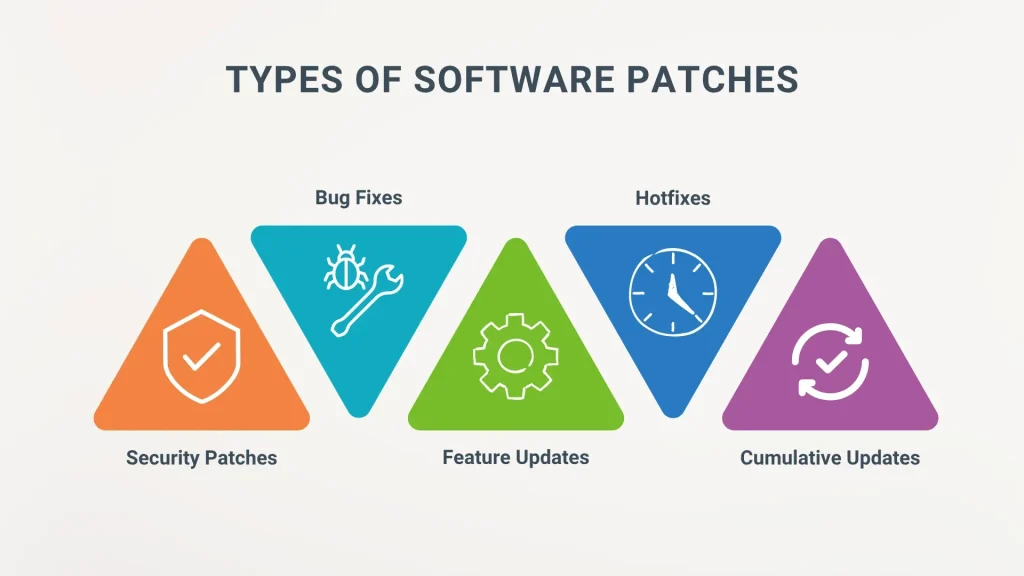
Software patches are more than just quick fixes; they are a disciplined part of operating system hygiene, application maintenance, and cyber defense. Security patches address vulnerabilities that threat actors could exploit, and vulnerability remediation is a central objective of timely, well-managed updates. This article explains what patches are, why they matter, and how to patch software effectively to reduce risk and improve stability. A structured patch management program coordinates discovery, testing, deployment, and verification, tying these updates to software update best practices. By treating patches as an ongoing routine rather than an ad-hoc task, organizations can strengthen defenses and sustain reliable operations.
Beyond the term patches, the same concept is known as updates, maintenance releases, or hotfixes that keep systems current and resilient. These actions fall under patch management and vulnerability remediation strategies that aim to close gaps before attackers exploit them. Organizations implement software update best practices to organize discovery, testing, deployment, and verification in a controlled workflow. In practice, teams monitor risk, prioritize critical fixes, and document outcomes to demonstrate compliance and sustain trust. In short, the essence remains the same: timely, well-planned changes to code and firmware protect people, data, and operations.
Software patches: What they are, why they matter, and how to patch software
Software patches are targeted updates designed to fix bugs, close security vulnerabilities, and enhance features across the entire technology stack—operating systems, applications, firmware, and cloud services. They are more than quick fixes; they represent a disciplined approach to IT hygiene and ongoing maintenance. When we consider how to patch software, patches become the operational mechanism that keeps systems resilient, secure, and up to date.
Why patches matter is about security, stability, and compliance. Security patches reduce the attack surface by addressing known vulnerabilities and support vulnerability remediation efforts after disclosures. Effective patch management ensures consistent security posture across devices and software, aligning with software update best practices and regulatory expectations.
The Patch Management Lifecycle: Discovery, Testing, Deployment, and Verification
The patch management lifecycle is the end-to-end process of identifying, testing, deploying, and validating fixes. It starts with discovery and inventory to know what assets require patches, followed by vulnerability assessment to prioritize what matters most. Testing in a controlled environment helps catch compatibility issues before broad deployment, a core practice in patch management.
Deployment should be planned with minimal disruption, then verified and monitored for anomalies. Documentation and reporting complete the loop, supporting audits and continuous improvement. A mature lifecycle reduces downtime, improves reliability, and strengthens your vulnerability remediation posture over time.
How to Patch Software Effectively: Practical Steps for Teams
How to patch software effectively begins with building an accurate inventory of all software and devices, including versions and dependencies. Next, prioritize by risk so critical security patches take precedence, while not neglecting high-impact bugs that affect availability. Create a testing protocol and a staging environment to validate patches before production, a key step in patch management.
Schedule and communicate downtime to stakeholders to minimize business impact, and automate repeatable tasks where possible while preserving human oversight for changes with high risk. Validate post-deployment by confirming patch installation, clean reboots if required, and intact core functionality. Emphasize software update best practices by documenting changes and maintaining rollback options.
Security Patches and Vulnerability Remediation: Prioritization and Response
Security patches are a primary control against exploit kits and zero-day threats, but they are not a one-size-fits-all solution. Prioritize patches based on exposure, exploitability, and criticality to reduce risk quickly, while keeping in mind potential performance trade-offs. This focus supports vulnerability remediation efforts and aligns with a mature patch management program.
Emergency patching scenarios require rapid decision-making, validated deployment, and immediate verification to prevent exploitation. Align patching with incident response plans and risk tolerance, ensuring governance and oversight remain intact even under pressure. Regularly review the effectiveness of security patches as part of vulnerability remediation and compliance activities.
Patch Management in Different Environments: On-Prem, Cloud, and Mobile
Patch management in different environments varies by context. On-premises systems benefit from scheduled cycles and tested processes, with emergency patches for critical flaws. For cloud and SaaS, rely on provider-managed updates but stay informed about release notes and advisories affecting configurations, as part of software update best practices.
Mobile devices require dedicated controls such as MDM to enforce patching policies and ensure devices stay current. Legacy systems often need upgrade paths or mitigations when patches are no longer available, balancing risk with business needs. Across environments, ongoing vulnerability remediation and governance remain essential to maintain security posture.
Automating Patch Deployment: Tools, Automation, and the Human Factor
Automating patch deployment accelerates cadence and consistency. Use configuration management, patch management platforms, and vulnerability scanners to streamline discovery, testing, and rollout, while ensuring you can verify changes in production. Automation supports how to patch software at scale and reinforces a repeatable patch cycle.
Yet human factors stay crucial. Security teams must interpret risk correctly, and IT teams must balance speed with reliability. Clear change management, ongoing communication, and executive sponsorship drive successful patch programs, ensuring that security patches are applied timely and in alignment with patch management goals.
Frequently Asked Questions
What are software patches and why are security patches essential in patch management?
Software patches are targeted updates that fix bugs, close security vulnerabilities, and improve functionality. Security patches address vulnerabilities that attackers could exploit, making them a core part of patch management to reduce risk, improve stability, and support compliance.
How to patch software effectively: what are the essential steps for vulnerability remediation and software update best practices?
To patch software effectively, follow a structured process: build an accurate inventory, prioritize patches by risk, test in a staging environment, schedule deployments with minimal downtime, automate repeatable steps, verify success after deployment, and maintain rollback plans. This approach supports vulnerability remediation and adheres to software update best practices.
What is patch management and what are the key stages in the patch management process?
Patch management is the end-to-end process of identifying, testing, approving, deploying, and validating patches across devices and software. Its key stages include discovery and inventory, vulnerability assessment, testing, deployment, verification and monitoring, and documentation.
What are software update best practices for minimizing downtime and ensuring security patches deploy correctly?
Software update best practices for patching include automating scans and deployments where possible, scheduling regular patch windows, using phased rollouts, testing patches before deployment, monitoring systems after patching, and having rollback plans to ensure business continuity.
How can organizations implement vulnerability remediation through timely security patches across on-premises and cloud environments?
Organizations implement vulnerability remediation by applying timely security patches across on-premises and cloud environments through a centralized patch policy, continuous vulnerability scanning, risk-based prioritization, coordinated deployment, and comprehensive visibility across all assets.
What risks arise from delaying software patches and how does patch management help with compliance and governance?
Delaying patches increases the risk of exploits, data breaches, and regulatory non-compliance. Patch management provides audit trails, demonstrates due diligence, and helps meet regulatory requirements such as PCI-DSS, HIPAA, and GDPR through documented remediation and ongoing reporting.
| Aspect | Key Points |
|---|---|
| What Are Software Patches? |
|
| Why Software Patches Matter |
|
| Patch Management: From Reactive to Proactive |
|
| How to Apply Software Patches: Practical Steps |
|
| Best Practices in Patch Management |
|
| Patch Management in Different Environments |
|
| Testing, Validation, and Rollback |
|
| Automation, Tools, and Human Factors |
|
| Security Considerations |
|
| Compliance and Governance |
|