
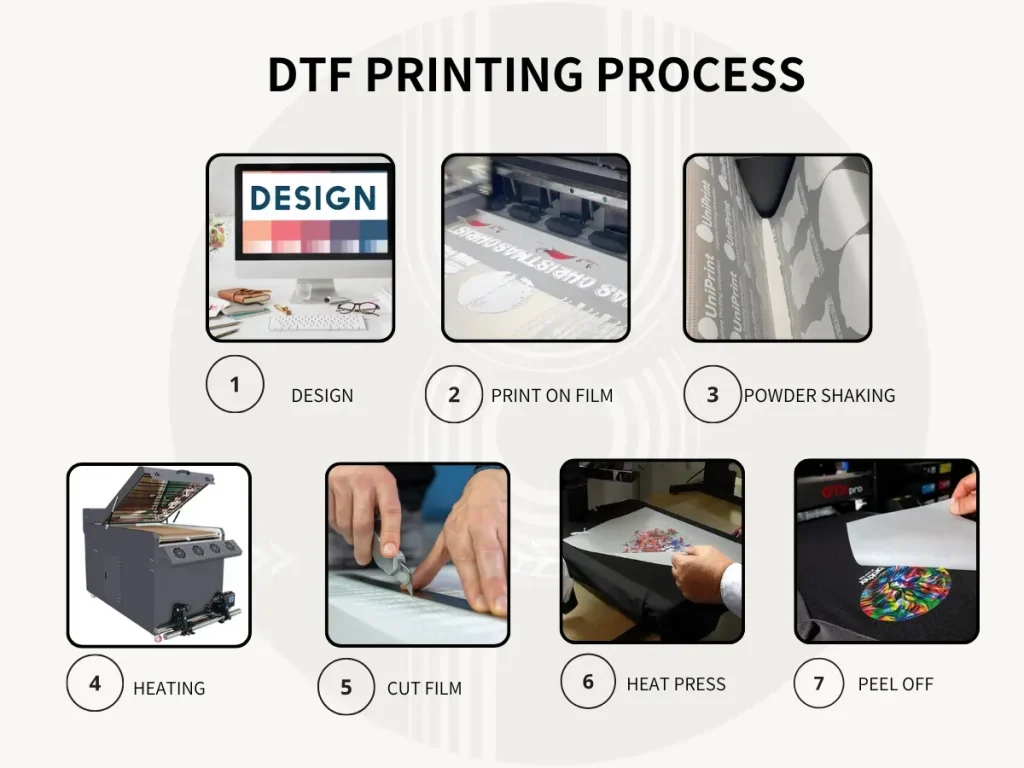
DTF printing basics are reshaping how small businesses and hobbyists approach garment customization, delivering vivid color, broad fabric compatibility, and scalable production. A key driver is the DTF gangsheet builder, a tool that arranges multiple designs on a single sheet to boost throughput and reduce waste. Using a well-planned gangsheet for DTF helps optimize material use, align designs, and simplify the curing and transfer steps. The end results are crisp DTF transfers with durable color and consistent adhesion across a range of fabrics. A solid DTF printer setup, including reliable white ink, proper curing, and a clean workflow, sets the foundation for confident experimentation and steady production.
DTF Printing Basics: What Direct-to-Film Means for Garment Personalization
DTF printing basics introduce direct-to-film as a flexible method for garment customization. In this workflow, designs are printed onto a PET film, coated with adhesive powder, cured, and then transferred to textiles using heat. This approach delivers vivid color reproduction and compatibility with a wide range of fabrics, making it a strong option for small businesses and hobbyists alike.
Compared with traditional screen printing or heat transfer vinyl, DTF transfers offer scalable production and robust wash durability. The process emphasizes efficient color management and the potential to group multiple designs on a single sheet, which is where the gangsheet concept and related tooling come into play for higher throughput.
Leveraging a DTF Gangsheet Builder to Maximize Throughput
DTF gangsheet builder tools are designed to arrange multiple designs onto one sheet, enabling batch printing and faster transfer preparation. By consolidating several designs into a single gangsheet, you reduce setup time, handling, and material waste while keeping precise margins and alignment cues for post-print separation.
Using a gangsheet for DTF workflow helps you optimize sheet utilization and streamline the curing and transfer process. A dedicated DTF gangsheet builder supports layout planning, bleed control, and export settings that translate directly into more consistent results and fewer misregistration issues across large runs.
Design and Color Management for DTF Transfers
Design and color management are central to achieving high-quality DTF transfers. Focus on clean vector art or high-resolution raster designs, and translate those assets into a sheet layout that preserves legibility and edge details after transfer. This section also emphasizes the importance of white ink planning and the correct layering order to ensure vibrant results on both light and dark fabrics.
Color profiles, ICC calibration, and continuous testing are essential for predictable outcomes across batches. White underlays can dramatically affect color density, so plan the white layer order within the gangsheet and verify alignment with underlying color layers to maintain crisp edges and accurate hues.
DTF Printer Setup: Essential Materials and Best Practices
DTF printer setup starts with selecting a printer capable of reliable white ink output, compatible DTF film, and the adhesive system you plan to use. The foundational materials also include adhesive powder, a powder shaker for even coating, and proper curing equipment to activate the adhesive before transfer.
Beyond the printer itself, you’ll need a heat press with even temperature control, ventilation for curing powders, and a workflow tool like a gangsheet builder or compatible design software to arrange designs on a single sheet. Ensuring substrate compatibility and maintaining a clean, lint-free workspace further contribute to consistent, repeatable results.
Troubleshooting DTF: Common Pitfalls and Remedies
Common issues in DTF printing include ghosting or color misregistration, which often stem from substrate tension, platen temperature, or misalignment. Regular nozzle checks, head alignment calibration, and maintaining a stable print environment can significantly reduce these problems across gangsheet runs.
Powder clumping, uneven adhesion, and white-layer issues on dark fabrics are frequent hurdles. Remedies include ensuring even powder distribution, proper curing times, and verifying white ink layer curing to prevent smearing. Addressing film tension, temperature, and peeling technique also helps prevent tearing or sticking during transfer.
Scaling Your DTF Operations: Automation, Documentation, and Sustainability
As you scale from hobbyist projects to small-batch production, workflow automation becomes a key driver of efficiency. Look for automation options in gangsheet creation, print scheduling, and archival storage of approved designs and print settings to streamline repeat jobs and maintain consistency across runs.
Documentation and process discipline enable reliable scalability. Keeping a log of ink densities, powder amounts, cure times, and transfer temperatures lets you reproduce successful results and quickly troubleshoot deviations. Sustainable practices, such as minimizing waste through optimized sheet layouts and reusing packaging materials, further improve profitability and environmental impact.
Frequently Asked Questions
What are the DTF printing basics and how does the process work?
DTF printing basics refer to direct-to-film printing, where designs are printed onto a PET film with water-based inks, often using a white ink base for light fabrics, then coated with adhesive powder, cured, and transferred to textiles with heat. This method delivers vibrant color, wide fabric compatibility, and scalable batch production.
How does a DTF gangsheet builder improve efficiency for gangsheet for DTF workflows?
A DTF gangsheet builder lets you arrange multiple designs on one sheet, reducing setup time, handling, and material waste. It also helps enforce precise margins, bleed, and alignment cues, streamlining the transfer process.
What should I consider for a proper DTF printer setup to ensure reliable DTF transfers?
Key considerations include a DTF printer with reliable white ink, compatible DTF film, adhesive powder, curing equipment, and a heat press. Also optimize color management with calibrated profiles and run a stable print environment to achieve consistent DTF transfers.
What are DTF transfers and how do they compare to other methods like screen printing or heat transfer vinyl?
DTF transfers are designs printed on PET film with adhesive powder, cured, then heat-transferred to fabrics. Compared with screen printing or heat transfer vinyl, DTF offers brighter color, easier multi-design runs, and better fabric versatility, especially for small-batch production.
How can I troubleshoot common issues when creating a gangsheet for DTF transfers?
Common issues include misregistration, ghosting, or powder clumping. Troubleshoot by verifying alignment marks and margins, performing nozzle checks and calibration, ensuring even powder application and proper curing, and confirming white ink layering and film tension during transfer.
What is a practical getting-started workflow for DTF printing basics using a gangsheet builder?
Start by creating and arranging designs on a single gangsheet with your gangsheet builder. Then print the gangsheet, check ink density and alignment, apply adhesive powder evenly, cure the powder, peel, and transfer to fabric at the recommended temperature and time. Finally, cool and test durability, adjusting future gangsheet layouts as needed.
| Section | Key Points |
|---|---|
| Introduction | – DTF stands for direct-to-film; a process of printing onto PET film, coating with adhesive powder, curing, then transferring to textiles with heat. – DTF enables vivid color, wide fabric compatibility, and scalable batch production; gangsheeting enables multi-design runs on one sheet for efficiency. |
| What is DTF Printing? | – Uses water-based inks on film media; white ink base is common for light fabrics or high opacity, then color layer. – Adhesive powder is applied, dried, and cured; heat press transfers design with a strong, flexible bond. |
| Why a Gangsheet Builder Matters | – A gangsheet packs many designs on one sheet; reduces separate print runs. – Benefits: lower setup time, less handling, reduced waste, higher production efficiency. – A gangsheet builder arranges, optimizes, and exports these multi-design sheets with margins, bleed, and alignment cues. |
| Getting Started: Equipment & Materials | – DTF printer with reliable white ink – DTF film compatible with printer/adhesive system – Adhesive powder and shaker – Heating/drying equipment or curing oven – Heat press or garment press with even pressure and temp control – DTF gangsheet builder or compatible design software – Transfer textiles (cotton, blends; verify adhesive compatibility) – Clean, ventilated workstation |
| Choosing the Right Materials | – DTF film designed for your inkset; high color vibrancy and easy release – Adhesive powder with consistent size/distribution; suitable layer thickness – Compatible inks with accurate color on light and dark fabrics; regular color profile calibration |
| Design & Preparation for the Gangsheet | – Use clean vector or high-res raster designs; arrange assets to maximize sheet utilization – Define margins, gaps, and bleed; ensure designs won’t look cropped if misalignment occurs – Plan white underprint first if needed; align color layers with white base – Proof on small film section before full gangsheet run |
| Step-by-Step Getting Started Workflow | 1) Create and arrange designs on a single sheet; group by fabric type/print times 2) Print the gangsheet; monitor ink, alignments, nozzle checks 3) Apply adhesive powder evenly with a shaker 4) Cure the powder per guidelines 5) Peel transfer film to reveal print; soft peel if needed 6) Transfer to fabric at recommended temp/time/pressure (preheat if needed) 7) Allow to cool and test wash durability; adjust heat/pressure/adhesive as needed |
| Best Practices for Design & Color Management | – Design at high resolution; scale down for gangsheet; keep text legible – Calibrate color profiles; use ICC profiles consistently – White ink strategy affects color on dark fabrics; plan layering order – Plan safe margins; avoid edge cutoffs – Favor vector text; avoid overly fine details that may blur after pressing |
| Common Pitfalls & Troubleshooting | – Ghosting/misregistration: check substrate tension, platen temp, alignment marks; run nozzle checks – Powder clumping/uneven adhesion: ensure even powder, proper curing; store powder dry – White layer issues on dark fabrics: ensure full cure; adjust print speed/ink density – Fabric bleeding: use proper pre-treatment and fabrics compatible with adhesive – Film tearing/sticking: proper film tension; clean, debris-free transfer area |
| Tips for Efficiency with the Gangsheet Builder | – Batch design placement: group similar print times to reduce idle printer time – Consistent margins: use templates for uniform gaps – Real-world testing: print on different fabrics to understand adhesive behavior – Documentation: log ink density, powder amount, cure time, transfer temp for reproducibility – Maintenance: clean heads, check belts, ensure platen flatness to prevent wear and misregistration |
| Advanced Considerations for Long-Term Success | – Workflow automation: scale with automation for gangsheet creation, scheduling, and archival storage – Color consistency: strict color management; maintain profiles for fabrics and inks – Material variability: maintain fabric test library for new substrates – Sustainability: optimize layouts to minimize waste; reuse/recycle packaging where possible |
Summary
Conclusion: The base content outlines how DTF printing can reshape garment customization for small businesses and hobbyists, with emphasis on gangsheet-building to boost throughput, reduce waste, and improve transfer quality. It covers fundamentals of DTF printing, the value of a gangsheet builder, step-by-step workflows, best practices, common pitfalls, and long-term considerations for scalable production. By following these guidelines and continually refining color management and alignment, you can move from a hobbyist setup to a reliable DTF printing production process.